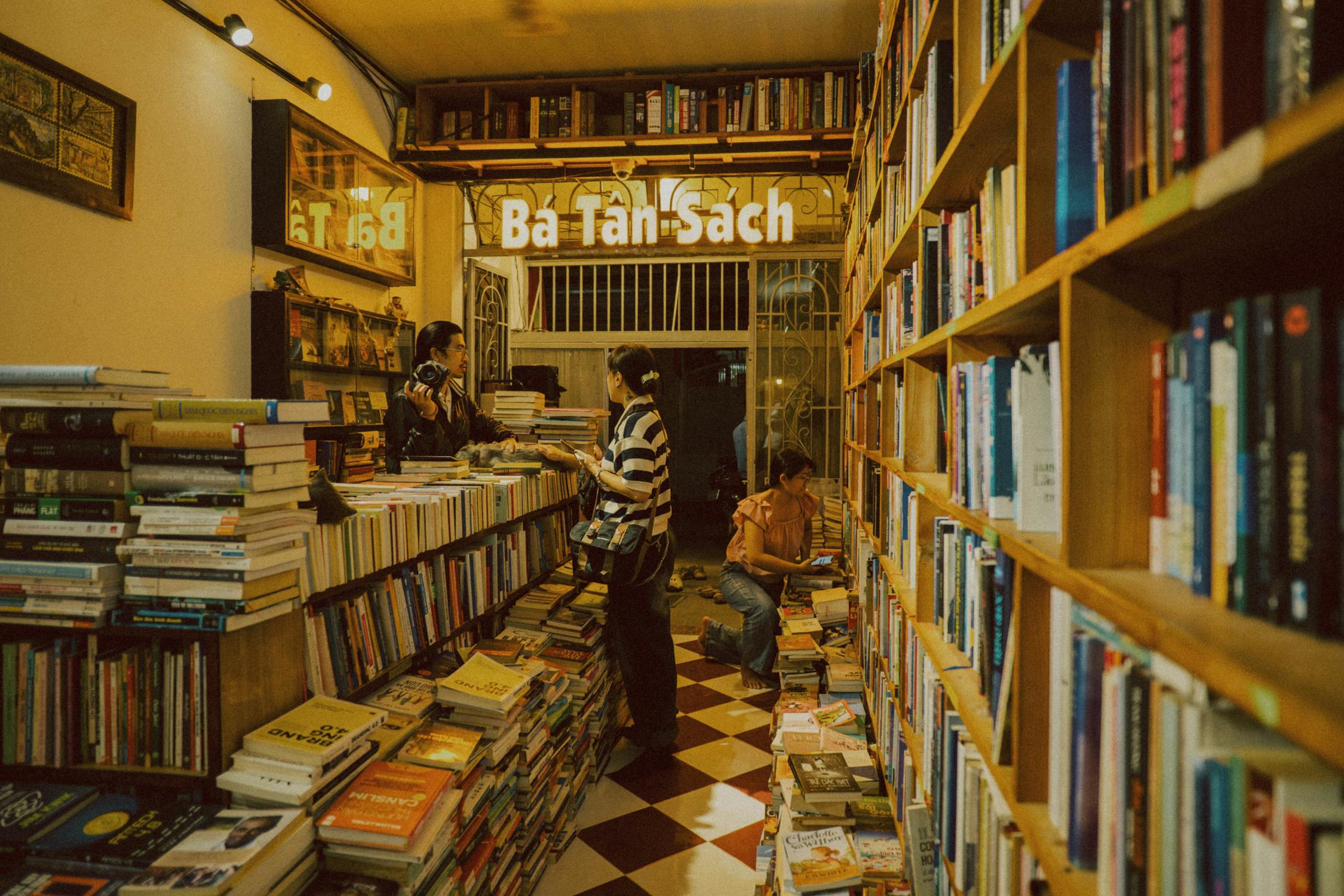
Ricoh GR III Bookstore & Library Photography: Settings, Tips & Best Presets
There's something deeply satisfying about photographing bookstores and libraries. The rows of spines, the warm overhead lighting, the readers lost in their own worlds -- these spaces practically beg to be documented. And no camera does it more naturally than the Ricoh GR III.
Its pocketable body lets you wander through narrow aisles without bumping into shelves. The 28mm lens captures the scale of towering stacks without distortion. And the fast f/2.8 aperture pulls usable shots even in the dimmest reading rooms. This guide covers exactly how to get the most out of your GR III in bookstores and libraries -- from core settings to preset recipes you can apply right now.
Why the Ricoh GR III Excels in Bookstores and Libraries
The GR III isn't just convenient for these spaces -- it's genuinely well-suited to them:
- Ultra-compact body won't draw attention from staff or other visitors in quiet environments
- 28mm equivalent lens is wide enough to capture full shelving walls and reading rooms without fish-eye distortion
- f/2.8 maximum aperture isolates individual book spines, reading lamps, and details against soft backgrounds
- APS-C sensor handles the mixed lighting of tungsten overheads, window spill, and desk lamps with minimal noise
- Macro mode (6cm close focus) lets you shoot extreme close-ups of vintage covers, typeset pages, and shelf labels
- Electronic shutter mode eliminates shutter sound entirely -- essential in quiet library environments
- In-body image stabilization (4 stops) compensates for slower shutter speeds in dim interiors
Essential Camera Settings for Bookstore & Library Photography
Shooting Mode: Aperture Priority (Av)
Bookstore lighting is rarely consistent. A window-lit reading corner behaves completely differently from a basement rare-books section. Aperture Priority (Av) lets you lock in your depth of field while the camera adjusts exposure on the fly.
Choose your aperture based on the shot:
- f/2.8 for detail shots -- a single book spine, a reading lamp, a hand turning a page
- f/4 - f/5.6 for mid-range compositions -- a shelf section, a reading nook, a desk arrangement
- f/5.6 - f/8 for wide environmental shots -- full aisles, grand reading rooms, storefront windows
ISO Configuration
Navigate to MENU > Shooting Settings > ISO Sensitivity and configure:
| Setting | Recommended Value |
|---|---|
| ISO Auto | On |
| ISO Range | 100 - 6400 |
| ISO Minimum Shutter Speed | 1/40s |
Most bookstores and libraries use warm but dim lighting. An upper limit of ISO 6400 keeps noise under control while still letting you shoot handheld. The GR III's APS-C sensor holds up remarkably well at these sensitivities -- grain at ISO 3200-6400 actually complements the vintage feel of many bookstore shots.
If you're in a particularly well-lit modern library with large windows, you can tighten the range to ISO 100-1600 for cleaner files.
White Balance
Bookstore lighting is almost always warm -- tungsten bulbs, vintage fixtures, and amber-toned LEDs are the norm. Your white balance choice depends on intent:
- AWB (Auto White Balance) for accurate, neutral color reproduction
- Tungsten / Incandescent if you want to cool down overly warm orange casts
- CTE (Color Temperature Enhancement) to lean into the warmth and make the golden tones even richer -- this is the more popular choice for mood-driven bookstore photography
For libraries with fluorescent lighting, Fluorescent 1 (Daylight) corrects the green cast these fixtures often produce.
Focus Settings
| Setting | Recommended Value |
|---|---|
| Focus Mode | Snap Focus |
| Snap Distance | 2.5m (shelves) or 1.5m (details) |
| AF Area | Spot (for precise focus on spines/details) |
Snap Focus at 2.5m is the workhorse setting for walking through aisles and shooting shelves as you go. Switch to 1.5m when you stop to photograph reading nooks or tabletop details. For extreme close-ups of book covers and pages, switch to Macro mode via the lens ring.
When you need precision -- a specific title on a shelf, a reader's hands on a page -- switch to AF with Spot area and half-press to lock focus.
Image Stabilization
Enable Shake Reduction (SR) at all times in these environments. At f/2.8 with ISO 6400, you'll often be shooting at 1/40s - 1/80s. The 4-stop SR system is the difference between a sharp frame and a blurry one.
Composition Tips for Bookstore & Library Photography
1. Use Leading Lines from Shelves
Book aisles create powerful leading lines that draw the eye deep into the frame. Position yourself at one end of an aisle and shoot straight down it. The converging lines of shelves on both sides create natural depth. For extra impact, wait for a person to appear at the far end -- they become the focal point.
2. Shoot Details at f/2.8
The GR III's f/2.8 aperture turns a row of book spines into a beautiful gradient of sharp-to-soft. Focus on one book and let the rest fall away. This works especially well with colorful spines or when isolating a title that catches your eye.
3. Frame Through Gaps in Shelves
Look for gaps between books or between shelf sections. Shooting through these frames adds layers and depth to your images. A reader glimpsed through a gap in the shelves tells a much richer story than a straight-on portrait.
4. Capture the Light
Window light streaming into a library is some of the most beautiful available light you'll find indoors. Look for:
- Shafts of light illuminating dust particles between stacks
- Backlit readers silhouetted against bright windows
- Pools of warm light from reading lamps on desks
- Dappled light filtered through window blinds across a row of books
5. Include the Human Element
An empty library is architecturally interesting. A library with a person reading, reaching for a book, or walking between stacks is alive. Don't be afraid to include people -- the GR III's silent electronic shutter and discreet size make candid shots natural.
6. Go Vertical for Tall Shelves
Floor-to-ceiling bookshelves demand vertical framing. Tilt up slightly to emphasize the height and density of the collection. This works especially well in grand libraries and multi-story bookstores.
Best Preset Recipes for Bookstore & Library Photography
Warm Nostalgia
A golden, film-like look that enhances the cozy warmth of bookstores. Ideal for shops with tungsten lighting and wood interiors.
| Setting | Value |
|---|---|
| Image Control | Positive Film |
| Saturation | +1 |
| Hue | 0 |
| Contrast | +1 |
| Sharpness | +2 |
| Key | 0 |
| Highlight Correction | Auto |
| Shadow Correction | Auto |
| White Balance | CTE |
This recipe leans into warm tones and adds a touch of contrast to make wood shelves and leather bindings pop. The CTE white balance amplifies the golden ambient light rather than correcting it away.
Quiet Monochrome
A soft, grain-textured black and white look perfect for libraries with dramatic architecture and overhead lighting.
| Setting | Value |
|---|---|
| Image Control | Monotone |
| Filter Effect | Green |
| Toning | Warm |
| Contrast | +1 |
| Sharpness | +2 |
| Key | -1 |
| Highlight Correction | On |
| Shadow Correction | Medium |
The green filter brightens skin tones and gives book pages a luminous quality. Warm toning adds a subtle sepia undertone that keeps the black and white from feeling cold. Dropping the key by -1 creates a moodier, more atmospheric exposure.
Faded Paperback
A desaturated, slightly faded look inspired by the aged pages and sun-bleached covers found in secondhand bookshops.
| Setting | Value |
|---|---|
| Image Control | Bleach Bypass |
| Saturation | -1 |
| Hue | 0 |
| Contrast | +2 |
| Sharpness | +1 |
| Key | 0 |
| Highlight Correction | Auto |
| Shadow Correction | Low |
| White Balance | Tungsten |
Bleach Bypass gives a naturally desaturated, high-contrast foundation. Pulling saturation down by -1 pushes the look further toward muted, vintage tones. The Tungsten white balance adds a cool blue cast that plays beautifully against warm shelf wood.
Library Daylight
A clean, bright look for modern libraries with large windows and natural light. Keeps colors accurate while adding subtle punch.
| Setting | Value |
|---|---|
| Image Control | Natural |
| Saturation | +1 |
| Hue | 0 |
| Contrast | 0 |
| Sharpness | +2 |
| Key | +1 |
| Highlight Correction | Auto |
| Shadow Correction | Auto |
| White Balance | Daylight |
This is your go-to for well-lit spaces where you want the architecture and colors to speak for themselves. The +1 key brightens the overall exposure, and Natural image control avoids over-processing.
Handling Tricky Lighting Scenarios
Mixed Lighting (Windows + Overhead Fixtures)
Many bookstores combine cool daylight from windows with warm tungsten overheads. This creates color temperature conflicts that auto white balance may struggle with.
Solution: Set white balance to AWB and shoot in the direction of one dominant light source. If you're facing a window, the cool light dominates and AWB handles it cleanly. If you're shooting into the interior, the warm light takes over. Avoid compositions where both sources compete equally -- that's where color casts get messy.
Very Dark Interiors (Rare Book Rooms, Basement Shops)
Some of the most atmospheric bookstores are also the darkest.
| Setting | Value |
|---|---|
| Mode | Aperture Priority (Av) |
| Aperture | f/2.8 (wide open) |
| ISO | Auto, up to 6400 |
| SR | On |
| Minimum Shutter Speed | 1/30s |
At these settings, you'll squeeze every photon out of the scene. Brace the camera against a shelf or stack of books for extra stability. If you're still getting blur, switch to TAv mode and lock in both f/2.8 and 1/30s, letting ISO float.
Harsh Overhead Fluorescents
Older libraries sometimes have unflattering fluorescent tubes that cast a green tint.
- Set White Balance to Fluorescent 1 (Daylight) to correct the green
- Increase Shadow Correction to Medium to lift the harsh shadows these lights create
- Drop Saturation to -1 to tame the unnatural color cast in skin tones
Bookstore vs. Library: Adjusting Your Approach
While both spaces involve books, the photographic challenges differ:
Bookstores tend to be warmer, cozier, and more visually cluttered. Lean into this. Shoot tight compositions, isolate details, and use the warm lighting to your advantage. Presets like Warm Nostalgia and Faded Paperback shine here.
Libraries often feature grander architecture, more uniform lighting, and stricter rules about photography. Shoot wider to capture the scale. Use the environment itself -- vaulted ceilings, long reading tables, repeated arches -- as your composition framework. Quiet Monochrome and Library Daylight work best.
In both cases, the GR III's silent shutter and pocket-sized body let you shoot without disrupting the atmosphere that makes these spaces special.
Quick Reference: Settings at a Glance
| Scenario | Mode | Aperture | ISO | WB | Snap Distance |
|---|---|---|---|---|---|
| Aisle walkthrough | Av | f/5.6 | Auto 100-3200 | CTE | 2.5m |
| Book spine detail | Av | f/2.8 | Auto 100-6400 | AWB | 1.5m |
| Reading room wide | Av | f/8 | Auto 100-1600 | Daylight | 2.5m |
| Dark interior | Av | f/2.8 | Auto 100-6400 | CTE | 2.5m |
| Cover close-up | Av / Macro | f/2.8 | Auto 100-3200 | AWB | Macro |
| Window-lit reader | Av | f/4 | Auto 100-1600 | AWB | AF Spot |
Final Thoughts
Bookstores and libraries are some of the most rewarding indoor environments to photograph. The textures, the light, the quiet human moments -- it all comes together in a way that rewards patience and a thoughtful eye. The Ricoh GR III, with its discreet form factor and capable sensor, is the ideal companion for this kind of work.
Start with the Warm Nostalgia preset for your first outing, adjust as the light dictates, and let the space guide your compositions. Browse our complete collection of Ricoh GR III presets to find more recipes, or grab a preset bundle to have a full toolkit ready for any lighting scenario.
Get a free recipe + 15% off your first order
Our Natural Analog recipe (exact settings for the GR III, GR IIIx and GR IV) and a personal discount code, straight to your inbox.
No spam. Unsubscribe in one click.