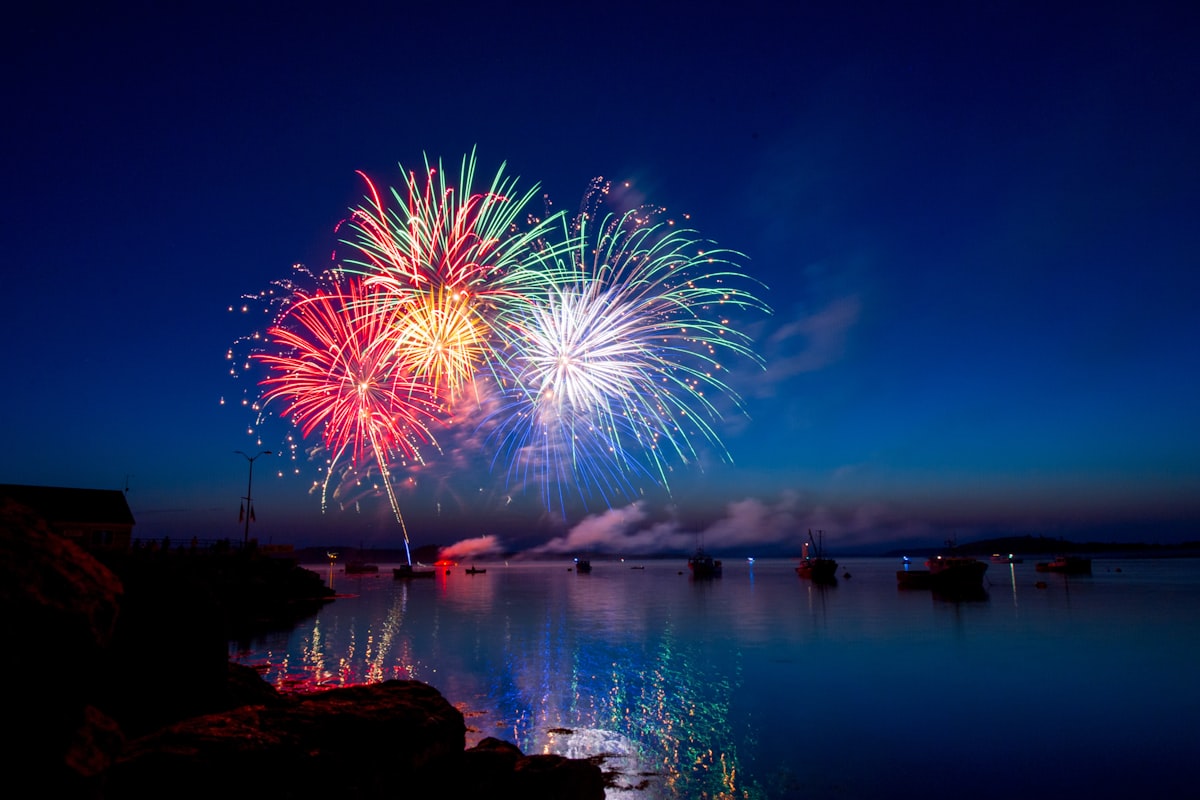
Ricoh GR III Fireworks Photography: Settings, Recipes, and Tips for Stunning Shots
Fireworks are one of the most rewarding — and most frustrating — subjects in photography. The bursts are unpredictable, the light changes frame to frame, and you're shooting handheld in the dark while surrounded by crowds. Most guides assume you're carrying a tripod and a full-frame mirrorless system. But what if you're standing in a crowd on the Fourth of July with nothing but a Ricoh GR III in your pocket?
Good news: the GR III is surprisingly capable at fireworks photography. The wide 28mm lens captures expansive sky coverage, the manual controls let you lock in exposure, and the compact size means you actually have the camera with you when the show starts. This guide covers everything from essential settings to in-camera recipes designed specifically for fireworks.
Why the Ricoh GR III Works for Fireworks
The GR III has several advantages for fireworks that larger cameras don't:
- 28mm wide-angle lens captures broad swaths of sky, fitting entire bursts without cropping — plus it includes the skyline or crowd for context
- APS-C sensor handles high ISO noise better than any compact or phone, critical for night shooting
- Fast startup (0.8 seconds) means you won't miss the opening salvo fumbling with your camera
- Compact and pocketable — you'll actually have it with you at festivals, rooftop parties, and public displays
- Snap Focus mode lets you prefocus at infinity and fire instantly, eliminating autofocus hunting in the dark
- Intervalometer built-in for automated shooting during long displays
- Image Stabilization (SR) provides 4 stops of shake reduction for handheld shooting
The 28mm focal length is wider than the typical 35mm or 50mm used for fireworks, which is actually an advantage. You don't know exactly where in the sky the next burst will appear, and a wider field of view gives you margin for error. You can always crop in post — you can't crop wider.
Essential Camera Settings for Fireworks
Shooting Mode: Manual (M)
Unlike most GR III photography where Aperture Priority works well, fireworks demand full manual control. The brightness of each burst varies wildly, and automatic metering will chase exposure up and down, giving you inconsistent results.
Set the mode dial to M. This locks your aperture, shutter speed, and ISO so every frame has consistent exposure. Once you dial in settings during the first few bursts, you can shoot the rest of the show without touching the dial.
Aperture: f/5.6 to f/8
This may seem counterintuitive — why stop down when it's dark? Because fireworks are extremely bright point sources of light against a dark sky. A wide aperture like f/2.8 will:
- Overexpose the bright trails into blown-out white blobs
- Reduce sharpness due to the GR III's optical characteristics wide open
- Give you too shallow a depth of field for distant subjects
The sweet spot:
- f/5.6 — Best for distant displays where fireworks appear smaller in the frame. Lets in enough light for the surrounding cityscape
- f/8 — Ideal for closer displays. Maximum sharpness across the frame, clean starburst patterns on the light trails
- f/11 — Use only if the display is very close and intensely bright. Watch for diffraction softening
Start at f/8 and adjust from there based on your first few test shots.
Shutter Speed: The Key Variable
Shutter speed is where fireworks photography gets interesting. Different speeds produce completely different looks:
- 1/15s to 1/4s (Handheld) — Captures individual bursts as they expand. The GR III's image stabilization makes these speeds feasible handheld. You'll get clean, discrete explosions with defined trails
- 1/2s to 1s (Braced) — Brace the camera against a railing, post, or your bag. Captures the full bloom of a single burst with longer light trails
- 2s to 4s (Stabilized surface) — Set the camera on a wall, table, or mini tripod. Multiple bursts layer into the same frame, creating complex patterns
- Bulb mode — Hold the shutter open for as long as you want. Best for capturing multiple sequential bursts in a single exposure. Use the 2-second self-timer to avoid shake when pressing the shutter
For handheld shooting without any support, stick to 1/8s to 1/4s. The SR stabilization can handle this range if you hold steady and exhale as you shoot.
ISO: Keep It Low
Since fireworks are bright, you don't need high ISO:
- ISO 200 — Start here. Fireworks are self-illuminated, and the dark sky doesn't need brightening
- ISO 400 — Use if you want more detail in the cityscape or landscape below the fireworks
- ISO 800 — Maximum recommended. Beyond this, the dark sky areas start showing visible noise
- Avoid Auto ISO — In manual mode, Auto ISO defeats the purpose. Lock it in
Focus: Snap Focus to Infinity
Autofocus is nearly useless for fireworks. The camera hunts in the dark, and by the time it locks, the burst is gone.
The GR III's Snap Focus mode is the solution:
- Go to MENU > Focus > AF Mode > Snap
- Set Snap Focus Distance to ∞ (Infinity)
- Now every half-press instantly sets focus to infinity — no hunting, no delay
Alternatively, switch to MF (Manual Focus) and rotate the rear dial to set focus to infinity. The on-screen distance scale confirms your setting.
Either method guarantees that every firework burst is tack sharp. Set it once and forget it for the entire show.
Fireworks Preset Recipes
1. Vivid Burst — Bold and Saturated
A punchy, high-contrast look that makes firework colors pop against the night sky.
- Image Control: Vivid
- Saturation: +2
- Hue: 0
- High/Low Key: 0
- Contrast: +2
- Contrast (Highlight): +1
- Contrast (Shadow): -2
- Sharpness: +2
- Shading: 0
- Clarity: +2
- White Balance: Daylight
- Grain Effect: Off
This recipe maximizes the color intensity of fireworks — reds are deep, blues are electric, golds shimmer. The crushed shadows keep the night sky truly black, and the boosted clarity enhances the fine detail of light trails. Daylight white balance keeps colors accurate without the warmth shift of Auto WB.
2. Film Night — Analog Festival
A warm, nostalgic look that captures the atmosphere of summer festivals and celebrations.
- Image Control: Retro
- Saturation: 0
- Hue: +1
- High/Low Key: +1
- Contrast: +1
- Contrast (Highlight): 0
- Contrast (Shadow): +1
- Sharpness: 0
- Shading: +2
- Clarity: 0
- White Balance: CTE
- Grain Effect: Strong
The Retro image control paired with strong grain creates the look of shooting fireworks on film — think Kodak Portra 800 pushed a stop. CTE white balance enhances the warm ambient light from the crowd and cityscape below. The lifted shadows reveal more of the surrounding scene rather than letting it fall to pure black.
3. Cool Spectacle — Modern and Clean
A cooler, more editorial look that emphasizes the graphic quality of fireworks against the sky.
- Image Control: Positive Film
- Saturation: +1
- Hue: -1
- High/Low Key: -1
- Contrast: +1
- Contrast (Highlight): +2
- Contrast (Shadow): -1
- Sharpness: +3
- Shading: 0
- Clarity: +3
- White Balance: Fluorescent
- Grain Effect: Off
Fluorescent white balance shifts the overall tone cooler, making blue and white fireworks especially dramatic and giving gold bursts a green-gold split tone. The high sharpness and clarity settings emphasize the fine structure of each light trail. This is a bold, graphic look suited for social media and prints.
4. Smoke and Light — Atmospheric
A softer, moodier recipe that embraces the smoke, haze, and atmosphere of a fireworks display.
- Image Control: Bleach Bypass
- Saturation: -2
- Hue: 0
- High/Low Key: 0
- Contrast: +1
- Contrast (Highlight): -1
- Contrast (Shadow): +2
- Sharpness: 0
- Shading: +1
- Clarity: -1
- White Balance: AWB
- Grain Effect: Weak
Bleach Bypass desaturates the image while boosting contrast, creating a cinematic, almost war-photographer look. The reduced clarity softens the smoke and haze that fills the sky during long fireworks shows, turning it into atmosphere rather than distraction. Lifted shadows reveal detail in the smoke layers.
Composition Techniques
Include the Horizon
The most common fireworks photography mistake is pointing straight up at the sky. Without a reference point, fireworks lose all sense of scale. Instead:
- Position the horizon in the lower third of the frame
- Include buildings, bridges, water reflections, or treelines
- The 28mm lens makes this easy — it naturally captures both the sky and the ground
A fireworks burst over a city skyline tells a story. A fireworks burst against black sky is a screensaver.
Use Reflections
If you're near water — a lake, river, harbor, or even a wet street — position yourself to capture reflections. Fireworks reflected in water double the visual impact and add symmetry. The GR III's wide lens captures both the sky burst and its reflection in a single frame.
Frame with Foreground Elements
Silhouettes of spectators, trees, monuments, or architectural elements in the foreground add depth and narrative:
- Spectators' silhouettes convey the shared experience of watching fireworks
- Tree branches create a natural frame around bursts
- Architectural features (bridges, arches, rooftops) anchor the composition
At f/8 with Snap Focus at infinity, foreground elements beyond a few meters will be sharp alongside the fireworks.
Shoot the Crowd
Some of the best fireworks photos aren't of the fireworks themselves — they're of people watching. Faces lit by bursts, children pointing at the sky, couples silhouetted against the light. Switch to f/2.8, bump ISO to 1600-3200, and turn to face the crowd during a bright sequence.
Timing and Technique
Anticipate, Don't React
Fireworks have a rhythm. After the first few bursts, you'll notice patterns:
- A low whistling sound precedes each launch
- There's a brief pause between the launch and the burst
- Grand finales are telegraphed by rapid-fire launches
Start pressing the shutter when you hear the whistle, not when you see the burst. At 1/4s shutter speed, this timing captures the full expansion of the firework.
Use the Intervalometer
For a hands-off approach, set the GR III's interval shooting:
- MENU > Shooting Settings > Interval Shooting
- Set interval to 3 seconds
- Set number of shots to 999 (or your card capacity)
- Start the sequence just before the show begins
The camera fires every 3 seconds automatically. You'll get hundreds of frames to choose from, and you can enjoy the show instead of staring at a screen.
Shoot RAW + JPEG
For fireworks specifically, shoot RAW+ alongside your preset JPEGs. Fireworks present extreme dynamic range — bright trails next to pitch-black sky — and RAW files give you far more latitude to recover highlights or lift shadows in post-processing. The JPEG gives you the preset look immediately; the RAW is your insurance policy.
Brace Yourself
Without a tripod, stability is everything:
- Lean against a wall, pole, or railing — any solid surface reduces body sway
- Tuck your elbows into your sides and press the camera against your face or chest
- Exhale slowly as you press the shutter — the natural pause between breaths is your steadiest moment
- Use the 2-second self-timer if the camera is resting on a surface, to avoid shake from pressing the button
Quick Reference Cheat Sheet
| Scenario | Aperture | Shutter | ISO | Focus | Recipe |
|---|---|---|---|---|---|
| Handheld, single bursts | f/5.6 | 1/8s–1/4s | 200–400 | Snap ∞ | Vivid Burst |
| Braced, full blooms | f/8 | 1/2s–1s | 200 | Snap ∞ | Cool Spectacle |
| Surface, multi-burst | f/8 | 2s–4s | 200 | MF ∞ | Film Night |
| Crowd / faces | f/2.8 | 1/60s | 1600–3200 | Spot AF | Smoke and Light |
| Reflections on water | f/5.6 | 1/4s–1s | 200–400 | Snap ∞ | Vivid Burst |
| Finale barrage | f/11 | 1/8s | 200 | Snap ∞ | Cool Spectacle |
Final Thoughts
Fireworks photography with the Ricoh GR III comes down to preparation. Set manual exposure, lock focus to infinity, pick a recipe, and find a spot with a good horizon line. Once the show starts, the camera is ready — you just press the shutter.
The GR III won't give you the extreme telephoto close-ups that a 200mm lens delivers, but it gives you something better: the full scene. Fireworks over a city, reflected in water, framed by trees, watched by a crowd. That's the photograph people actually want to look at, and the GR III captures it in a camera that fits in your pocket.
Start with the Vivid Burst recipe at f/8, ISO 200, and 1/4s. Brace against something solid, include the horizon, and shoot. You'll have keepers before the grand finale.
Get a free recipe + 15% off your first order
Our Natural Analog recipe (exact settings for the GR III, GR IIIx and GR IV) and a personal discount code, straight to your inbox.
No spam. Unsubscribe in one click.