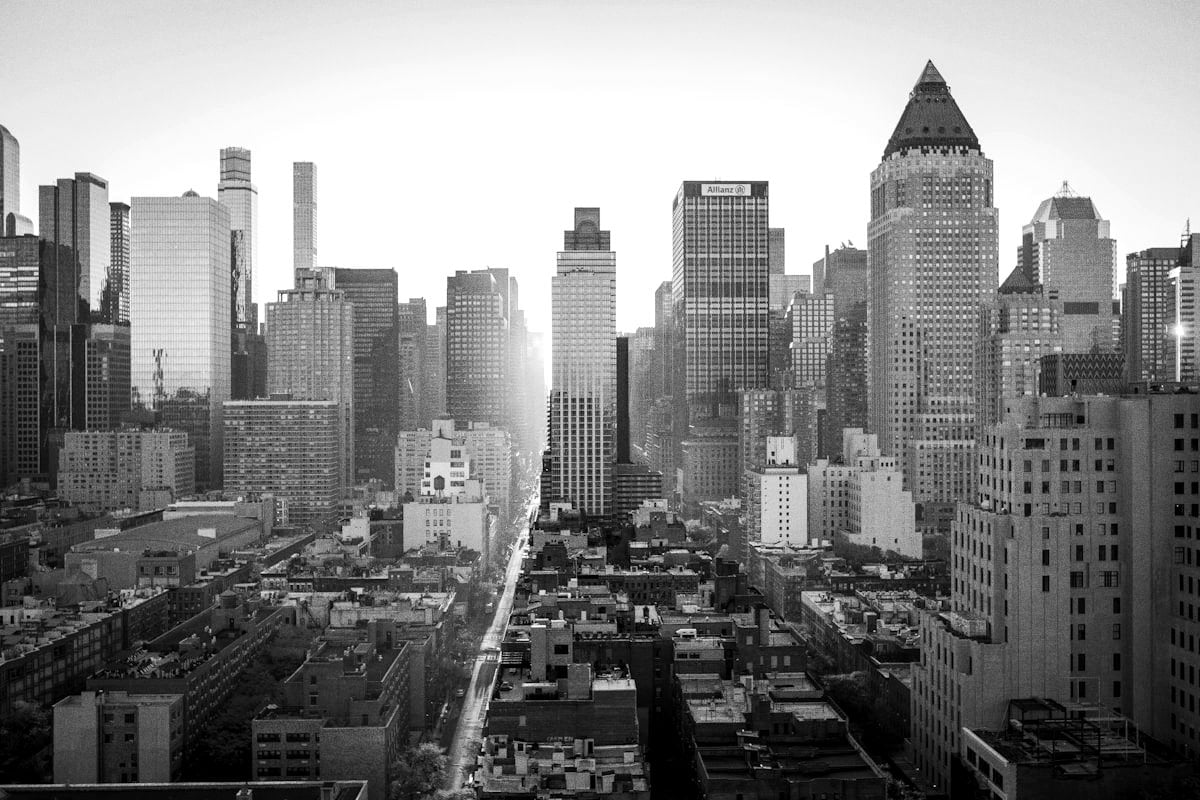
Ilford HP5 Plus 400 Recipe for the Ricoh GR III: The Forgiving Black & White Reportage Look
If Kodak Tri-X is the gritty, high-energy voice of black-and-white photography, Ilford HP5 Plus 400 is its calmer, more forgiving cousin. It's the film Don McCullin carried into war zones and the film generations of British photojournalists trusted in unpredictable light, precisely because it bends rather than breaks. HP5 is famous for an enormous exposure latitude, a gentle highlight shoulder, and smooth, well-behaved mid-tones that flatter faces and reward imperfect metering. The good news is that the Ricoh GR III's Monochrome Image Control can get you remarkably close to that classic reportage look — pocketable, instant, and darkroom-free.
In this guide we'll build a complete Ilford HP5 Plus 400 recipe for the Ricoh GR III, explain why each setting earns its place, and cover the light and subjects that make this gentle classic shine.
What Makes the Ilford HP5 Plus 400 Look
Before you touch the menu, it helps to know exactly what you're chasing. HP5 has a signature that's distinct from the punchier Tri-X:
- Wide, forgiving exposure latitude — HP5 holds detail across a huge range, so shadows and highlights both retain information rather than blocking up or clipping
- A soft highlight shoulder that rolls off gently, never harsh, even in bright skies
- Smooth, luminous mid-tones that give skin and skies a creamy, gradual quality
- Moderate, gentle contrast rather than aggressive black-and-white punch
- Fine but visible grain — present and organic, but tighter and less assertive than Tri-X's
- A documentary calm — HP5 renders the world honestly without dramatizing it
Where Tri-X says "look at me," HP5 says "let me tell you what happened." On the GR III, the trick is to resist over-contrasting and instead protect those long, smooth tonal transitions.
The Ilford HP5 Plus 400 Recipe for Ricoh GR III
Navigate to MENU > Still Image Settings > Image Control and select Monochrome as your base. Then dial in the following:
- Image Control: Monochrome
- Filter Effect: Off (or Yellow for slightly darker skies and more natural skin)
- Toning: 0 (neutral — HP5 is a true neutral black and white)
- High/Low Key Adjustment: 0
- Contrast: +1
- Contrast (Highlight): -2
- Contrast (Shadow): +1
- Sharpness: +1
- Shading: 0
- Clarity: +1
- Grain Effect: Weak
- White Balance: Auto (white balance has no tonal effect in Monochrome, but Auto keeps your live view neutral)
- ISO: Auto 200–3200
- Exposure Compensation: +0.3 as a starting point
Save this to one of your User custom modes (U1–U3) so you can recall the look instantly.
Why these settings work
Monochrome with neutral toning is the foundation. HP5 is a true neutral black and white with no warm or cool cast, so we leave toning at zero for an honest rendering.
Low global contrast (+1) paired with a strong highlight reduction (-2) is the heart of the HP5 look. That -2 highlight setting recreates the film's soft shoulder — bright skies, white shirts, and window light roll off gently instead of clipping to paper-white. The modest +1 shadow contrast keeps blacks present without crushing the rich shadow detail HP5 is loved for.
Clarity at +1 adds just enough mid-tone texture to feel filmic without tipping into the harsh, over-defined look of a heavy digital conversion. HP5 is about smooth gradation, so we use clarity sparingly.
Grain Effect set to Weak matters. Tri-X wants Strong grain; HP5's grain is finer and more refined, so Weak keeps texture present without overpowering those creamy mid-tones. The GR III's grain reacts to ISO, so it'll naturally intensify in low light — exactly like real film.
Exposure compensation at +0.3 is the single most "HP5" choice here. Classic reportage shooters routinely rated HP5 a touch generously to lift shadow detail, trusting the film's latitude to protect the highlights. Biasing exposure slightly bright gives you those open, detailed shadows while the -2 highlight contrast keeps the brights in check.
A Pushed "HP5 @ 1600" Variation
HP5 is one of the most push-friendly films ever made — photographers regularly shot it at 1600 or 3200 in low light, gaining contrast and grain in the process. To emulate that grittier, available-darkness look, try this:
- Image Control: Monochrome
- Filter Effect: Off
- High/Low Key Adjustment: -1
- Contrast: +2
- Contrast (Highlight): -1
- Contrast (Shadow): +2
- Sharpness: +1
- Clarity: +2
- Grain Effect: Strong
- ISO: Auto 1600–6400
- Exposure Compensation: -0.3
This version trades HP5's daylight gentleness for more bite: deeper shadows, snappier mid-tones, and heavier grain from the elevated ISO. It's the look of a roll pushed two stops for a dim café, a late-night street, or an indoor gig — still recognizably HP5, but with its sleeves rolled up.
A "Fine-Grain Portrait" Variation
For portraits and quieter scenes where you want HP5 at its most flattering and smooth, soften the recipe further:
- Image Control: Monochrome
- Filter Effect: Yellow
- High/Low Key Adjustment: +1
- Contrast: 0
- Contrast (Highlight): -2
- Contrast (Shadow): 0
- Sharpness: 0
- Clarity: 0
- Grain Effect: Weak
- ISO: Auto 200–1600
- Exposure Compensation: +0.5
The Yellow filter effect renders skin tones more naturally and adds a little tonal separation, while the lifted exposure and flat contrast keep everything creamy and gentle. This is the version for people, family moments, and any time you want elegance over edge.
Best Subjects and Light for the HP5 Look
HP5's forgiving character makes it the black-and-white film for difficult and changeable light — which is exactly where it earns its reputation:
- Overcast and flat light — where HP5 truly excels. The soft shoulder and smooth mid-tones turn grey skies into beautiful gradients instead of dead grey.
- Mixed and tricky light — alleys with patchy sun, interiors near windows, transitions from shade to light. HP5's latitude holds it all together.
- Reportage and documentary scenes — markets, protests, daily life, quiet candid moments. HP5 records without dramatizing.
- Portraits and people — the gentle contrast flatters skin and preserves catchlights and shadow detail in faces.
- Backlight and bright skies — the strong highlight reduction keeps clouds and bright backgrounds from blowing out.
Because HP5 thrives in less-than-perfect conditions, it pairs naturally with the kind of grab-and-go shooting the GR III was built for. If you love this gentle monochrome look but also want a high-drama option, the contrast-heavy Kodak Tri-X 400 recipe makes a perfect companion in your User modes.
Shooting Tips for Authentic Results
Expose for the shadows, trust the latitude. This is the opposite of the Tri-X mantra. HP5's whole personality is its forgiving shadows and protected highlights, so the slight positive exposure compensation in the base recipe leans into that. Open up the shadows and let the film hold the brights.
Shoot in Snap Focus. Set Snap Focus to 2m or 2.5m at f/8 and you'll have near-instant, zone-focused frames — exactly how reportage shooters worked with manual film bodies. New to it? Our Ricoh GR III Snap Focus guide walks through the setup.
Don't be afraid of grey days. Most people chase golden hour; HP5 is your reason to shoot the overcast afternoon everyone else skips. Flat light plus this recipe equals smooth, gorgeous tonality.
Let ISO climb. Don't fight low light with a tripod. Allowing the GR III to reach ISO 3200 or pushing into the variation above gives you grain that is the look, not a flaw.
Review in monochrome, commit to monochrome. Shooting JPEG with this recipe shows you the finished look on the LCD, training your eye to see in black and white. Shoot RAW+JPEG if you want a color safety net while previewing the HP5 rendering.
Final Thoughts
Ilford HP5 Plus 400 endures because it's the film that never lets you down — wide latitude, soft highlights, and smooth tonality that turn unpredictable light into honest, beautiful black and white. With the GR III's Monochrome Image Control pulled toward gentle contrast, a strong highlight roll-off, and restrained grain, your camera becomes a genuinely convincing HP5 machine that fits in a jacket pocket.
Load this recipe into a User mode, set Snap Focus, and go shoot the grey afternoon. You'll find HP5's quiet honesty is every bit as addictive as the real thing.
Want more black-and-white inspiration? Pair this with our Ricoh GR III black and white photography guide and the punchier Kodak Tri-X 400 recipe to cover the full range of the monochrome look.
Get a free recipe + 15% off your first order
Our Natural Analog recipe (exact settings for the GR III, GR IIIx and GR IV) and a personal discount code, straight to your inbox.
No spam. Unsubscribe in one click.