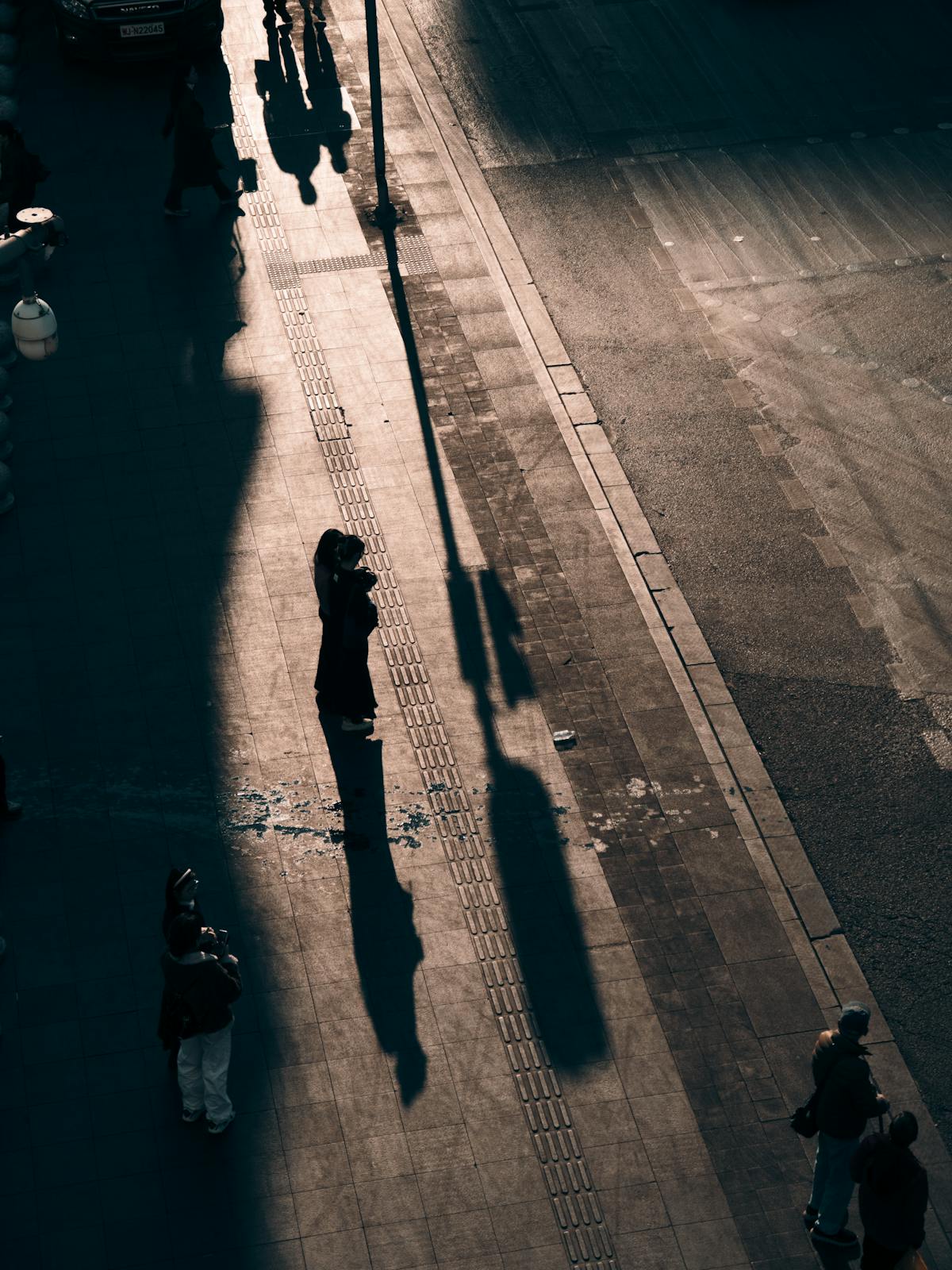
Ricoh GR III Shadow & Light Photography: Settings, Recipes, and Tips
Shadow and light photography is one of the most powerful ways to create dramatic, emotionally charged images -- and the Ricoh GR III is uniquely suited for it. The combination of its razor-sharp 18.3mm lens, responsive metering system, and deep custom image controls gives you everything you need to capture the interplay between darkness and illumination. Whether you're shooting harsh midday shadows on a city sidewalk or the soft glow of light streaming through a window, the GR III turns everyday scenes into striking compositions.
This guide covers the essential settings, preset recipes, and techniques for mastering shadow and light photography with your Ricoh GR III.
Why the Ricoh GR III Excels at Shadow & Light Photography
The GR III has several built-in advantages for this style of shooting:
- 18.3mm (28mm equivalent) wide-angle lens captures expansive scenes where shadows stretch across floors, walls, and streets
- Fast f/2.8 aperture lets in enough light to expose for highlights while shadows fall naturally to black
- APS-C sensor with excellent dynamic range preserves detail in both bright highlights and deep shadows when you need it
- Highlight and Shadow tone controls give you granular control over how the camera renders contrast in-camera
- Snap Focus lets you shoot instantly when a fleeting shadow pattern appears -- no waiting for autofocus to hunt in dark areas
- Silent electronic shutter means you can shoot discreetly in quiet spaces where shadow and light create intimate scenes
Essential Camera Settings for Shadow & Light Photography
Shooting Mode: Manual (M) or Aperture Priority (Av)
For shadow and light work, you need precise control over exposure. Automatic modes tend to "correct" deep shadows by brightening the image, which destroys the dramatic contrast you're after.
Manual mode (M) gives you total control. Meter for the highlights and let the shadows go dark. This is the preferred mode when lighting conditions are stable -- a shaft of sunlight through a doorway, window light hitting a wall, or a street scene with consistent overhead light.
Aperture Priority (Av) with negative exposure compensation works well for moving through changing scenes. Set exposure compensation to -1 to -2 EV to protect highlights and deepen shadows. The GR III's exposure compensation dial on the top plate makes this adjustment instant.
Metering Mode: Spot or Center-Weighted
The default multi-segment metering tries to balance the entire frame, which fights against the dramatic contrast you want. Switch to a more targeted metering mode:
- Spot metering reads only a small area at the center of the frame. Point it at your brightest highlight, lock exposure, then recompose. This ensures highlights are properly exposed while shadows fall to rich, deep black.
- Center-weighted metering biases the reading toward the center but considers the full frame. This works well when your subject is centered in a pool of light surrounded by shadow.
Navigate to MENU > Shooting Settings > Metering to change modes.
ISO Settings for Maximum Contrast
Lower ISO values produce cleaner shadows and punchier contrast:
- ISO 100-200 for bright outdoor scenes with hard shadows (midday sun, architectural shadows)
- ISO 400-800 for indoor shadow play with window light or artificial light sources
- ISO 100 with Auto ISO off when you want the cleanest possible files for post-processing
Avoid high ISOs (above 1600) for this style -- noise fills in the shadows and reduces the visual impact of pure black tones.
Focus Strategy for Shadow Scenes
Shadows often confuse autofocus systems because contrast edges aren't where you'd expect them. Use these approaches:
Snap Focus at 2.5m is ideal for street shadow photography. Set it and shoot the moment you see a person walking into a beam of light or a shadow pattern forming on a wall. No hunting, no delay.
Touch AF works well for composed shots where you can take your time -- place the focus point precisely on your subject within the light, not the shadow.
Manual Focus with focus peaking gives you the most precision for static compositions. Turn on focus peaking in red or white (MENU > Focus Settings > Focus Peaking) to see exactly what's sharp, even in contrasty scenes.
White Balance Considerations
Shadow and light photography often benefits from cooler or neutral white balance to enhance the dramatic mood:
- Daylight (5200K) produces accurate, neutral tones that let the shadows speak for themselves
- Shade (7000K) adds warmth to the lit areas while shadows remain cool -- creates a compelling color contrast
- Kelvin 4000-4500K produces cooler, moodier tones that emphasize the cinematic quality of shadow scenes
- Auto White Balance is acceptable but may shift between frames in changing light, reducing consistency in a series
Best Preset Recipes for Shadow & Light Photography
1. Hard Light Street -- Maximum Drama
Designed for harsh directional light and deep shadows in urban environments. This recipe pushes contrast to the extreme for bold, graphic images.
- Image Control: Standard
- Saturation: -1
- Hue: 0
- High/Low Key: -1
- Contrast: +2
- Contrast (Highlight): +2
- Contrast (Shadow): +2
- Sharpness: +2
- Shading: 0
- Clarity: +2
- Tone (Highlight): -2
- Tone (Shadow): -4
This pushes shadows to pure black while keeping highlights clean and sharp. The reduced saturation prevents colors from distracting the eye -- the focus stays on the interplay of light and dark.
2. Window Light Portrait -- Soft Chiaroscuro
Optimized for soft, directional window light falling across a subject. Creates a painterly quality reminiscent of Vermeer or Caravaggio.
- Image Control: Standard
- Saturation: 0
- Hue: 0
- High/Low Key: 0
- Contrast: +1
- Contrast (Highlight): -1
- Contrast (Shadow): +1
- Sharpness: +1
- Shading: 0
- Clarity: +1
- Tone (Highlight): -1
- Tone (Shadow): -2
This recipe preserves some shadow detail while still creating clear separation between light and dark areas. The pulled-back highlights prevent blown-out window light, and the gentle shadow compression maintains skin texture in the transition zones.
3. Noir Film Emulation -- Cinematic Monochrome
A black-and-white recipe that mimics the dramatic lighting of film noir. Best for scenes with a single strong light source and deep environmental shadows.
- Image Control: Monotone
- Filter Effect: Yellow
- Toning: None
- High/Low Key: -1
- Contrast: +2
- Contrast (Highlight): +1
- Contrast (Shadow): +3
- Sharpness: +2
- Shading: 0
- Clarity: +2
- Tone (Highlight): -1
- Tone (Shadow): -4
The yellow filter darkens blue sky tones and brightens skin, creating separation between subjects and backgrounds. The aggressive shadow contrast pushes dark areas to pure black, while highlight control keeps lit areas textured. This produces the classic film noir look straight out of camera.
4. Golden Hour Shadows -- Warm Contrast
Captures the long, dramatic shadows that form during late afternoon when the sun sits low on the horizon. Emphasizes the warm quality of golden light against cool shadows.
- Image Control: Vivid
- Saturation: +1
- Hue: 0
- High/Low Key: 0
- Contrast: +1
- Contrast (Highlight): 0
- Contrast (Shadow): +2
- Sharpness: +1
- Shading: 0
- Clarity: +1
- Tone (Highlight): -1
- Tone (Shadow): -3
The Vivid image control enriches the warm tones of golden hour light, while the shadow adjustments ensure the long shadows remain deep and defined. This recipe works especially well for street scenes, architectural details, and landscapes where shadows form strong leading lines.
Composition Techniques for Shadow & Light
Use Shadows as Leading Lines
Long shadows cast by buildings, poles, fences, and people create natural leading lines that guide the viewer's eye through the frame. Position yourself so these shadow lines lead toward your main subject or vanishing point. The GR III's 28mm field of view is wide enough to include both the shadow and its source in the same frame.
Frame Subjects in Pools of Light
Look for moments where a person or object sits in an isolated patch of light surrounded by shadow. This natural spotlight effect creates immediate visual hierarchy -- the eye goes straight to the brightest part of the image. Doorways, windows, gaps between buildings, and breaks in tree canopy all create these pools.
Shoot Into the Light Source
Backlighting creates rim light on subjects while the front falls into shadow. Position yourself so the light source (sun, window, lamp) is behind your subject. Expose for the bright background, and your subject becomes a dramatic silhouette or semi-silhouette. The GR III handles flare well with its coated lens, but you can use the shadow of a building or your hand to flag direct light from hitting the lens.
Embrace Negative Space
In shadow and light photography, darkness is not empty -- it's active negative space that gives weight and tension to the composition. Don't fight the urge to let large areas of the frame go completely dark. A figure emerging from shadow, a hand reaching into light, or a single object illuminated against blackness can be far more powerful than a fully-lit scene.
Look for Patterns and Repetition
Window blinds, fences, railings, staircases, and architectural elements cast repeating shadow patterns that create rhythm and texture. The GR III's sharp lens resolves these patterns beautifully. Shoot these patterns straight-on for graphic impact, or at an angle where they converge for added depth.
Use the Shadow of Your Subject
Sometimes the most interesting composition isn't the subject itself -- it's their shadow. A person's shadow stretching across a sunlit wall, the shadow of a bicycle on pavement, or the elongated shadow of a tree across a field can tell a more evocative story than a straight portrait of the subject.
Best Times and Locations for Shadow & Light Photography
Time of Day
- Early morning (6-8 AM): Low sun angle creates the longest shadows. Empty streets amplify the graphic quality of shadow patterns. Warm light temperature adds emotional depth.
- Midday (11 AM - 2 PM): Overhead sun creates harsh, defined shadows directly beneath subjects. Best for geometric shadow patterns from architecture and overhead structures.
- Late afternoon (4-6 PM): Similar to early morning with long shadows, but west-facing buildings and streets receive direct light. The "golden" quality intensifies as sunset approaches.
- Any time with single artificial light: Streetlamps, shop windows, spotlights, and neon signs all create dramatic shadow and light scenarios after dark.
Best Locations
- Covered arcades and colonnades -- repeating columns cast rhythmic shadows across the floor
- Narrow alleys -- a single strip of overhead sunlight between buildings creates a natural spotlight
- Stairwells and parking garages -- geometric structures with mixed light and shadow zones
- Windows and doorways -- natural frames where light transitions sharply to shadow
- Underpasses and tunnels -- the contrast between the dark interior and bright opening creates powerful compositions
- Markets with overhead canopies -- dappled light patterns from fabric or corrugated roofing
Post-Processing Tips for Shadow & Light Images
While the preset recipes above produce strong results straight out of camera, you can push the look further in post:
- Crush the blacks: Pull the black point slider down until shadow areas become pure black. This increases visual impact and simplifies the image.
- Dodge and burn: Selectively lighten areas in the light and darken areas in the shadow to increase the separation between them.
- Desaturate selectively: Reduce saturation in shadow areas while keeping colors in the lit portions. This mimics how the eye perceives real scenes -- color disappears in darkness.
- Add a subtle vignette: A slight darkening at the edges pushes the viewer's eye toward the center where your subject lives in the light.
- Convert to black and white: Many shadow and light images are stronger in monochrome because color can distract from the tonal drama. Try it even if you didn't shoot with a mono preset.
Common Mistakes to Avoid
Over-exposing to "recover" shadows. The whole point of this style is deep, rich shadows. If you expose to the right or brighten the image to see detail everywhere, you lose the drama. Expose for the highlights and let the shadows go.
Using fill flash. Flash fills in the shadows and flattens the natural contrast. Leave the flash off and work with the available light as it falls.
Shooting in flat light. Overcast skies and evenly diffused light don't produce the hard shadows this style requires. Wait for directional light -- sunshine, window light, or a single artificial source.
Centering every subject. Shadow and light compositions often work best with off-center placement. Let the shadow occupy one half of the frame and the lit subject the other. Use the rule of thirds or even more extreme negative space.
Ignoring the background. A well-lit subject against a cluttered, partially-lit background loses impact. Look for clean, dark backgrounds that let your lit subject pop.
Conclusion
Shadow and light photography is one of the most rewarding styles you can pursue with the Ricoh GR III. The camera's compact size lets you move quickly to catch fleeting shadow patterns, its manual controls give you precise exposure management, and its custom image settings let you dial in dramatic contrast without touching a computer. Start with the preset recipes above, practice reading light and shadow in your everyday environment, and you'll quickly develop an eye for the moments where darkness and illumination combine to create something extraordinary.
Explore our curated Ricoh GR III presets to unlock even more creative possibilities for shadow and light photography and beyond.